

Overview
Cambridge’s BEUDO (Building Energy Use Disclosure Ordinance) requires owners of large buildings to report annual energy use and reduce greenhouse gas emissions against a baseline. Unlike intensity-based standards, BEUDO limits are expressed as a percentage of each property’s own baseline emissions. Large non-residential properties must reach net zero emissions by 2035, and mid-sized non-residential properties by 2050.BEUDO Resources
Filing & Reporting
Property owners are required to report to the city every year through the BEAM portal.- Filing Deadline (May 1st): Annual reporting, including renewable energy certificate (REC) documentation, is due by May 1 of each year for the previous calendar year.
- Third-Party Data Verification: Energy data must be verified by an individual accredited through an approved organization (e.g. PE, Registered Architect, CEM, CEA, LEED AP O+M)
- Compliance Phases: Emissions reduction requirements begin with Compliance Period 1 (2026-2029) for non-residential properties with 100,000+ and 25,000 to 99,999 covered square feet (CSF).
Configuration
Follow these steps to ensure that the property is ready for compliance analysis:- Confirm the selected Reporting Period: Emissions calculations, penalty values, and compliance pathways all depend on the selected reporting period. Change the period to see how property performance over different 12-month time frames impacts compliance.
- Click on Details button to ensure that there is a high Data Completeness value associated with the reporting period. Data completeness should be as close to 100% as possible to ensure accurate analysis.
Calculating Emissions Limits
A property’s emissions limit under BEUDO is calculated as a percentage of its baseline emissions. The allowable percentage depends on the property’s size and the compliance period, and declines to zero at the net zero deadline.Baselines
- Default Baseline: The average of calendar years 2018 and 2019.
- Alternative Baseline: Owners may select an earlier baseline based on any pair of consecutive years from 2010 through 2018. Properties using an alternative baseline must achieve an additional 2.5% reduction for every year between the start of the baseline and 2018.
- Request Deadline: Alternative Baseline requests must be submitted by December 31 of the year prior to the property’s first compliance year. The Property Configuration Form must be completed and approved first.
Maximum Allowable Emissions
The tables below show the maximum allowable emissions for each compliance period, as a percentage of baseline emissions, for large and midsize covered properties. Click hereto view these tables in the source file. Non-Residential Properties with 100,000+ CSFExample: A non-residential property with 100,000+ CSF and an approved 2010–2011 Alternative Baseline must reduce annual emissions relative to its baseline by 33.3% (100% - 66.7%) starting in 2026, by 66.7% (100% - 33.3%) starting in 2030, and by 100% starting in 2035.
Non-Residential Properties with 25,000 to 99,999 CSF
New Covered Properties follow separate reduction schedules based on the year of their Certificate of Occupancy. See Section V.C of the BEUDO Procedures for details.
Calculating Penalties
To assess potential non-compliance exposure over time, a property’s annual energy use must be calculated for each energy subtype (e.g. electricity, natural gas, district steam), converted into annual emissions using BEUDO factors, and compared against the property’s annual emissions limit. Abisko performs this entire process automatically based on the selected reporting period.Property Emissions
Property emissions are calculated by multiplying the property’s annual consumption of each energy subtype by the corresponding BEUDO emissions factor and summing the results. Click here to view the emissions in the source file. Electricity Grid electricity emissions account for the Massachusetts Renewable Portfolio Standard (RPS). Only the non-RPS share of grid electricity is multiplied by the Electric Grid Residual Factor:- Electric Emissions (kg CO2e) = ((Grid Electricity (MWh) × (100% - Annual RPS Minimum)) - Voluntary RE Purchases (MWh)) × Electric Grid Residual Factor (kg CO2e/MWh)
- Voluntary RE Purchases: Only included for properties with qualifying, City-approved Renewable Electricity purchases.
- Fuel Emissions (kg CO2e) = Energy Consumed (MMBtu) × Fuel Emissions Factor (kg CO2e/MMBtu)
Emissions Factors: Compliance Period 1 (2026-2029)
Grid electricity factors are published for each compliance period by January 1 of the year prior to the period’s start. Factors for district steam (Vicinity, Biogen) and other Generation Facilities are determined annually and have not yet been published for Compliance Period 1.
Exceedance & Penalties
Under BERDO, non-compliance penalties are calculated by determining the difference between the building’s actual emissions and its emissions limit, then multiplying that excess by a daily penalty rate depending on the size of the building. Click here to read the policy document.Compliance Pathways & Relief
BEUDO provides several mechanisms that can reduce a property’s reported emissions or modify its reduction schedule.Alternative Compliance Credits & Payments
For the first compliance period, buildings may mitigate emissions from energy use by purchasing Alternative Compliance Credits for $234 per metric ton of CO2e per year. The price of the Alternative Compliance Credit for subsequent compliance periods shall be determined by the City of Cambridge.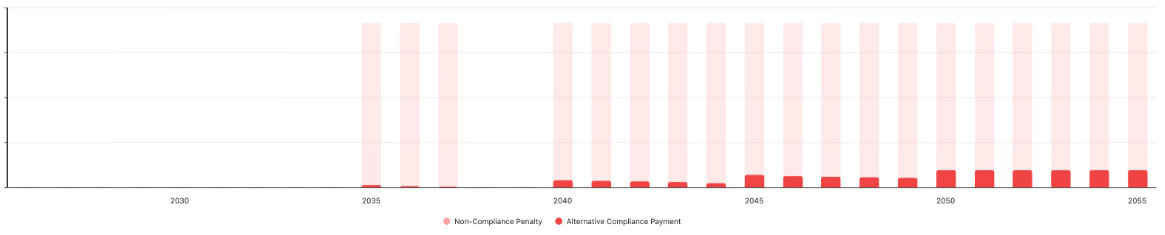
Renewable Electricity Procurement
- New Contract Approval: Renewable Electricity contracts must be submitted via the Renewable Electricity Approval Form in BEAM by April 1 of the year following the first compliance year in which the RECs will be used. The City responds within 90 days.
- New Procurement Types: Procurement types not listed in the Regulations may be submitted for approval before contract signing and by the end of the applicable compliance year.
- REC Retirement: Owners must attest to the quantity of RECs used by each property by the May 1 reporting deadline. Unbundled RECs cannot be resold or reassigned once purchased.
Hardship Compliance Plans
Owners facing qualifying hardships may apply for an alternative reduction schedule, alternative baseline, alternative property configuration, or energy exemption. Qualifying criteria fall into five categories:- Financial: Bankruptcy, lack of capital, or delays in incentive programs.
- Ownership: Individual non-residential condominiums with multiple owners.
- Regulatory / Contractual: Long-term energy contracts, pre-existing leases, renewable energy delays, grid or permit delays, or conflicting standards.
- Technical / Operational: Space constraints, manufacturing loads, historical status, or baseline vacancy.
- Other: Natural disasters, an adopted long-term decarbonization strategy aligned with BEUDO, or other circumstances at the Review Board’s discretion.
Deferral Plans
Owners may request to defer emissions reduction activities for up to five years, for example to align them with other planned work. Deferral plans must include an alternative annual reduction schedule demonstrating that total cumulative emissions do not exceed those of the standard schedule.Setting Custom Limits
Abisko automatically calculates emissions, baselines and limits using the default methodology outlined in the BEUDO Procedures. In some cases, however, properties may be subject to alternative baselines or users may wish to evaluate exposure under different assumptions. To support these use cases, Abisko allows users to set a custom emissions baseline value and any corresponding baseline period. Abisko uses these values to automatically recalculate all compliance period limits and penalty estimates. allowing users to test different scenarios. If no custom baseline is defined, Abisko uses the default calculated limits.To Add/Edit/Delete Custom Limits
Property → Compliance → Exposure → Cambridge - BEUDO- Click on the Set Baseline button
- Open the BEUDO Baseline panel
- To add/edit a custom baseline value
- Hover the mouse over the row in the table you would like to edit
- Click the edit icon that shows itself on the right side to open the sidebar
- Edit the value and save
- To delete a custom baseline value
- Hover the mouse over the row in the table for the value you would like to delete
- Click the trash icon that shows itself on the right side to delete
- To add/edit a custom baseline value