

Overview
Energize Denver aims to reduce energy use and emissions from large buildings by setting energy performance targets that become more stringent over time.Filing & Reporting
The annual Energize Denver benchmarking deadline is June 1 of every year, which requires complete performance data for the previous calendar year to be submitted via the benchmarking portal. Submissions must be verified by a certified professional and performance targets should be verified with the city. Click here to view a Benchmarking Checklist provided by the City of Denver.- Large buildings (GFA > 25,000 ft2): Must benchmark annually and meet EUI targets in 2028 (interim) and 2032 (final) based on the property use type.
- Other buildings (5,000 ft2 < GFA < 24,999 ft2): Do not have to send annual Benchmarking Reports or meet EUI performance requirements. Instead, these buildings have two options:
- Improve Lighting: Certify that at least 90% of the building’s total lighting is provided by LED lights or that all lighting meets 2019 Denver Building and Fire Code for power density
- Improve Energy Source: Utilize onsite or offsite renewable power generation to meet a minimum of 20% of the building’s annual site energy usage
Configuration
Follow these steps to ensure that the property is ready for compliance analysis:- Confirm the selected Reporting Period: Emissions calculations, penalty values, and decarb pathways all depend on the selected reporting period. Change the reporting period to see how property performance over different 12-month time frames impacts compliance.
- Click on Details button to ensure that there is a high Data Completeness value associated with the reporting period. Data completeness should be as close to 100% as possible to ensure accurate analysis.
Calculating EUI Targets
A building’s EUI targets are based on the breakdown of its property uses as tracked in ESPM. Abisko automatically calculates EUI targets and transparently displays each step of the calculation process.ESPM Property Uses
Abisko displays all ESPM property uses of the property along with associated floor areas and EUI targets in a table near the bottom of the report. Click here to see a list of Energize Denver property use types and associated target EUI values.
Property Use Type Adjustments
To calculate a property’s final EUI target, Abisko adjusts energy-use targets for property use types based on several details. Click here to learn more about target adjustments (Page 86). Operating Hours: For Office, Retail Store, Worship Facility, Refrigerated Warehouse, Non-Refrigerated Warehouse and Supermarket property uses, the applicable EUI target is adjusted based on the weekly operating hours entered for property use.- Example: If an office space operates over 60 hrs/week, its EUI target is increased.
For fully enclosed parking, the factor depends on if the supplementalHeating attribute is set to TRUE or FALSE in ESPM.
Data Centers
Similar to parking areas, if a property includes a data center, the total annual energy is adjusted prior to calculating EUI by multiplying the total data center floor area by 2,000 kBtu/ft² and adding the result to the property’s total annual energy.
Final EUI Target
The final EUI target is calculated by multiplying the floor area of each property use type by its corresponding EUI target, summing these values, adding any adjusted energy contributions from parking, pools, and data centers, and then dividing the result by the total floor area of all property use types included in the calculation. 𝐵 = [( Σ𝑙𝑘∙𝑠𝑘 )+ Σaj] / Σ𝑙𝑘- B = the total building EUI target for a building with multiple property use types
- 𝑠𝑘= the EUI target associated with the property use type, k
- 𝑙𝑘= the total floor area a property use type, k
- a𝑘= the total adjusted energy associated with each special property type, j
Interim EUI Target
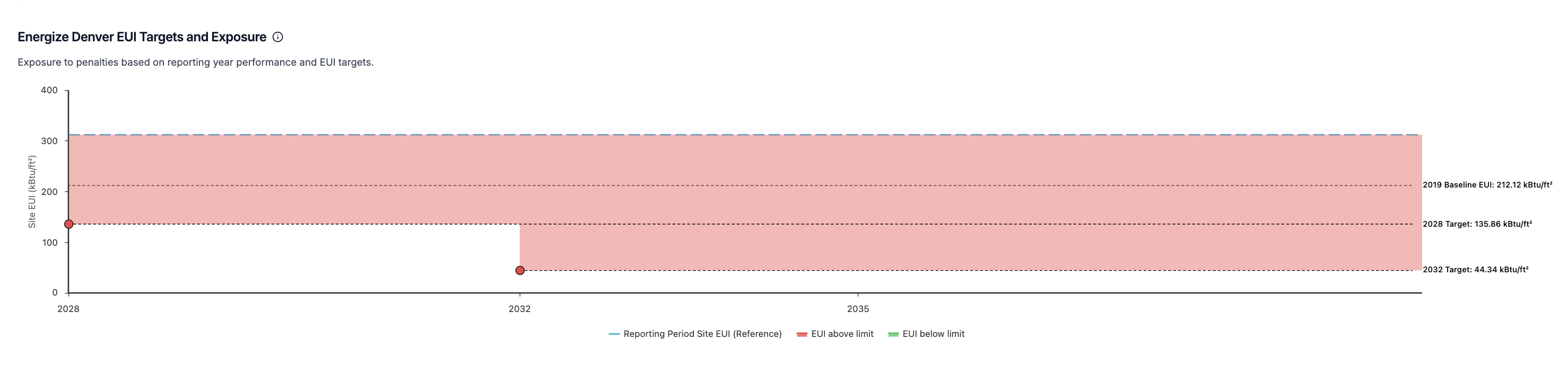
Building owners must reach their final EUI target by 2032. However, they must also reach an interim EUI target by 2028.In April 2025, the final and interim target deadlines were adjusted from 2030 (final) and 2024/2027 (interim) to 2032 (final) and 2028 (target).
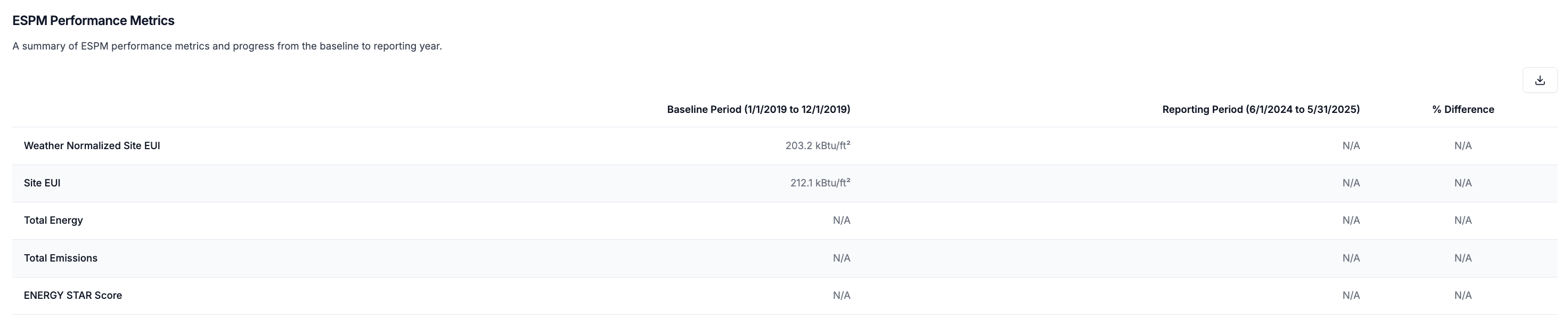
- Interim (2028) Target = Baseline_EUI - [Baseline_EUI - Final_Target_EUI] * 5 / 11
Electrification Credit
To qualify for an electrification credit, at least 80% of the property‘s annual energy consumption must be electric. This credit makes it easier to comply and reduces potential penalties by increasing the 2032 EUI target by 10%.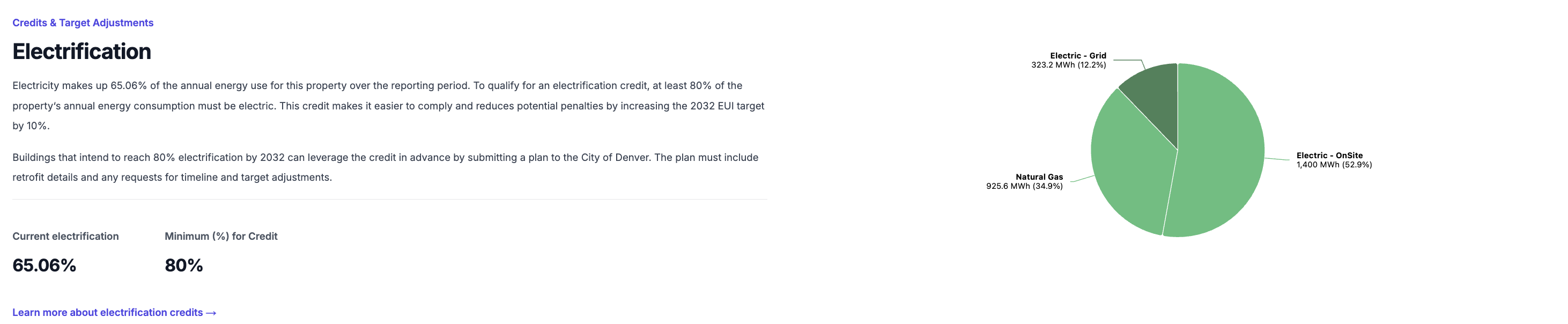
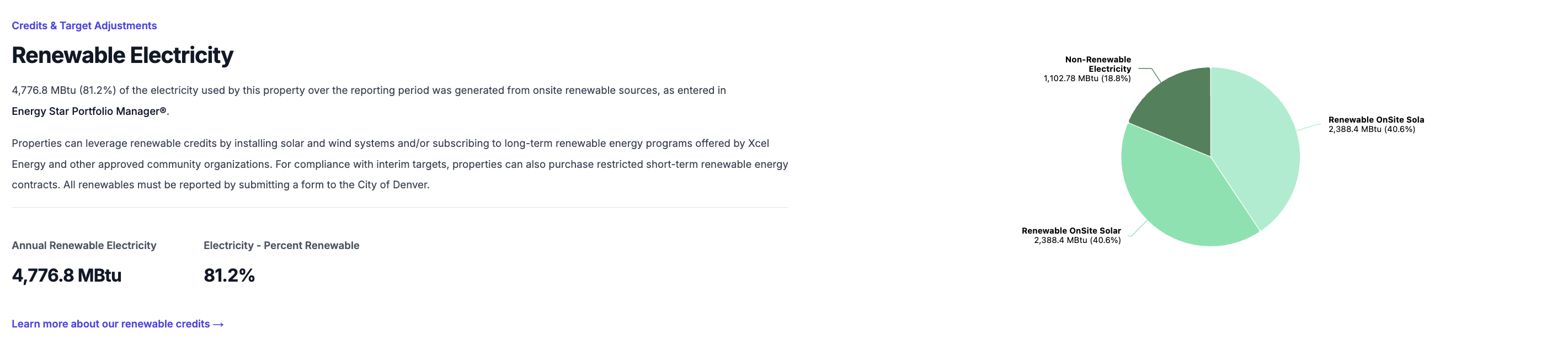
For each kilowatt-hour (kWh) of electricity generated by onsite or offsite renewable systems, 1 kWh is deducted from the building’s reported annual energy use. If the renewable electricity is generated within the City of Denver, 1.5 kWh is deducted for each kWh generated.
Calculating Penalties
Non-compliance penalties are assessed based on how much a building’s total annual energy exceeds its target for a given year. The penalty rate is based on whether the property has opted in for a timeline extension and users can select different penalty rates to understand how they effect penalty totals over time.
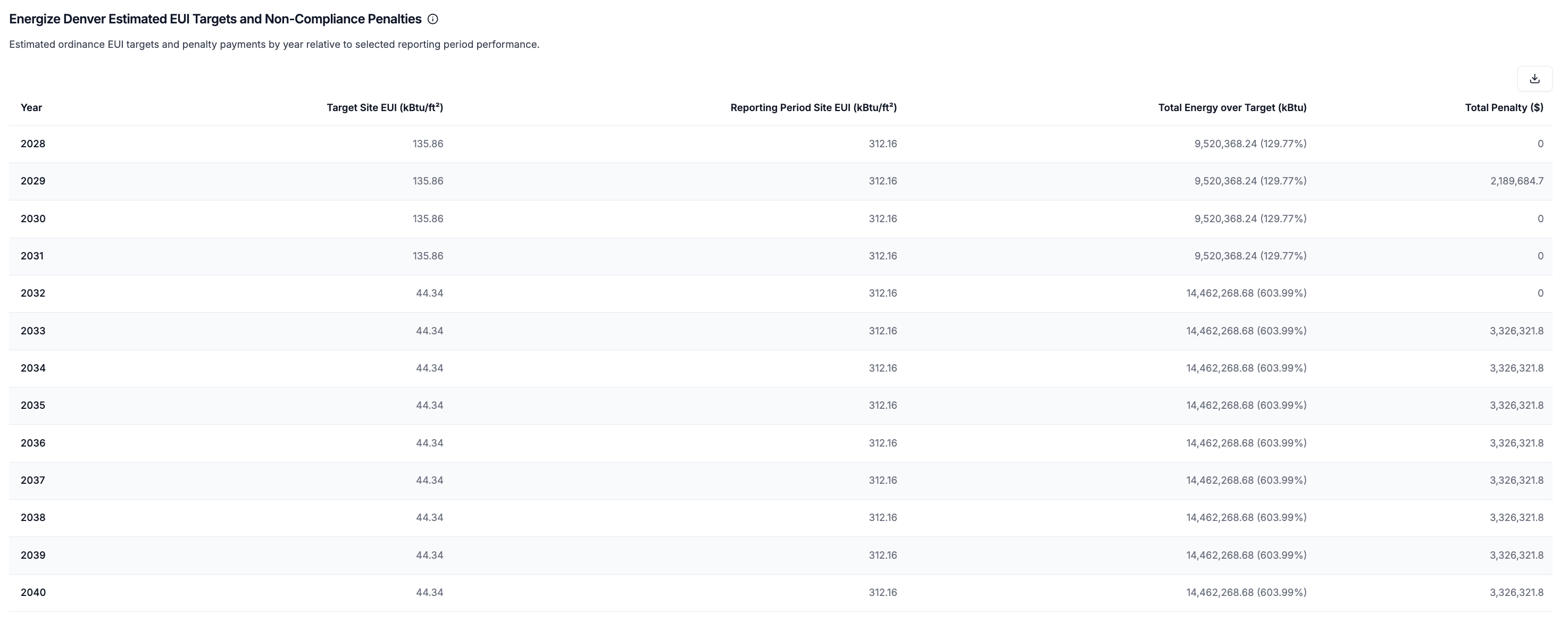
Abisko supplements the EUI and penalties charts with a detailed table showing EUI targets, performance and annual penalties for each year through 2040. Users can use this table to identify years in which the property is out of compliance and download the data for external analysis.
Setting Custom Targets
Abisko automatically calculates EUI targets using the default methodology outlined in published technical guidance. In some cases, however, buildings may be subject to alternative prescribed targets, or users may wish to evaluate non-compliance penalties under different baseline and target assumptions. To support these use cases, Abisko allows users to define custom EUI baselines & targets for the property. Once a custom value is applied, Abisko automatically recalculates all compliance metrics and penalty estimates. If no custom values are defined, Abisko uses the default calculated values.To Add/Edit/Delete Custom Targets or Baselines
Property → Compliance → Exposure → Energize Denver- Click on the Set Targets or Set Baseline button
- Open the sidebar
- To add/edit a custom value
- Hover the mouse over the row in the table for the value you would like to edit
- Click the edit icon that shows itself on the right side
- Edit the value and save
- To delete a custom value
- Hover the mouse over the row in the table for the value you would like to delete
- Click the trash icon that shows itself on the right side to delete
- To add/edit a custom value
Compliance Pathways
Abisko enables users to evaluate the impact of proposed energy measures on a property’s EUI over time. Users can model different combinations of measures and see how each scenario affects the property’s EUI and non-compliance penalties through 2040. This functionality allows users to align long-term decarbonization strategies with BPS requirements and capital planning efforts. With this feature, users can:- Test different energy efficiency pathways and their impacts on regulatory exposure
- Identify the most cost-effective compliance strategies
- Prepare and submit non-compliance mitigation plans to local regulators
Select Measures
Property → Compliance → Exposure → Energize Denver- Click on the Select Measures button
-
Open the Measures Selection sidebar
- Check the box next to each measure that should be included in the compliance analysis
- Check the box above the table to automatically select all measures
- Click save after finalizing the measure selection
- Check the box next to each measure that should be included in the compliance analysis
Review Charts & Tables
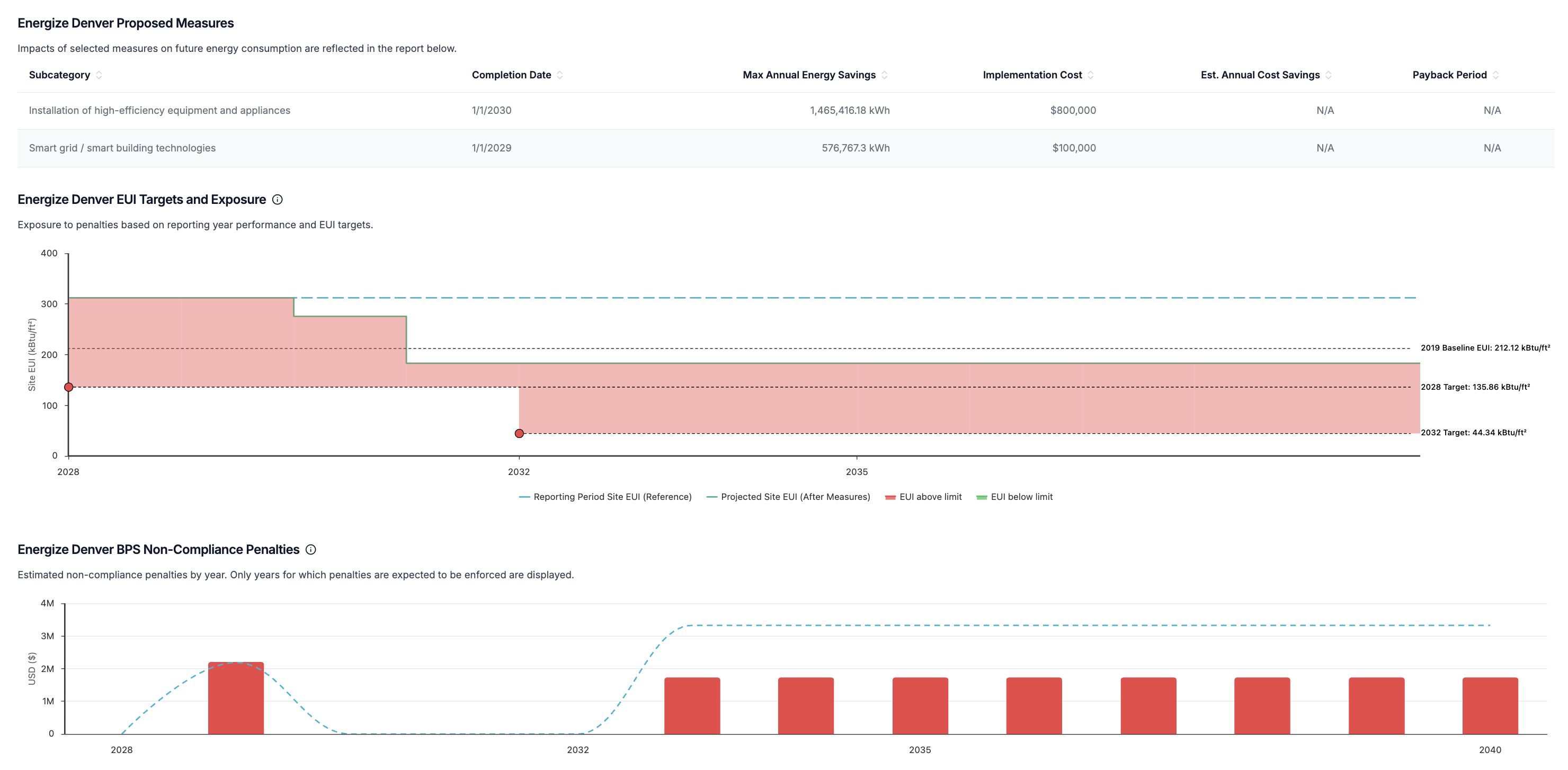
After saving all selected measures, all charts and tables in the report will automatically update to show the impact of each measure on the property’s EUI and non-compliance penalties.- Proposed measure impacts will begin to take effect on the calendar year following the completion date of the measure.
- e.g. if completion date = 5/5/2028, changes begin to take effect 2029
- Absolute values entered for each energy subtype (e.g. electric, natural gas) are subtracted from the total annual consumption of that subtype for the selected reporting period.
- Percentage values entered for each energy subtype are converted to absolute values by multiplying the percentage by the total annual consumption of that subtype for the selected reporting period. The converted value is then treated as an absolute value.
- Measures are applied independently (no interactive effects) and total reductions for each energy subtype are capped by the total subtype consumption of the reporting period.
- e.g. If 20 measures include 10% annual electricity savings, this will be capped to 100% annual electricity savings, resulting in 0 electricity-related emissions
- Annual energy savings are additive and persist over time