Performance Metrics
Users can track and report emissions for each space type and energy type.Space-based Performance Metrics (Click to expand)
Space-based Performance Metrics (Click to expand)
Meter Assignments
To enable space-based performance tracking and Scope 1, 2, and 3 emissions reporting, energy meters must be assigned to their appropriate space types. All meters, regardless of whether they are in-metric or out-of-metric, can be assigned to space types.Methodology
The methodology for calculating emissions for each space type and energy type is similar to that used for calculating whole building location-based emissions, except that all meters assigned to a space type are included in calculations, regardless of in-metric status.Click here to view the methodology for calculating whole building location-based emissions.
Property Tracking
Navigate to Property → Spaces → Emissions → ‘Emissions by Space Type’Configure Settings
Using the bottoms located at the top-right, confirm all spaces and meter assignments.- Assign Meters: Click here to learn more.
- Units
Annual Emissions Use by Space Type
Changes in emissions from the base period to the reporting period by space type, broken down by energy type.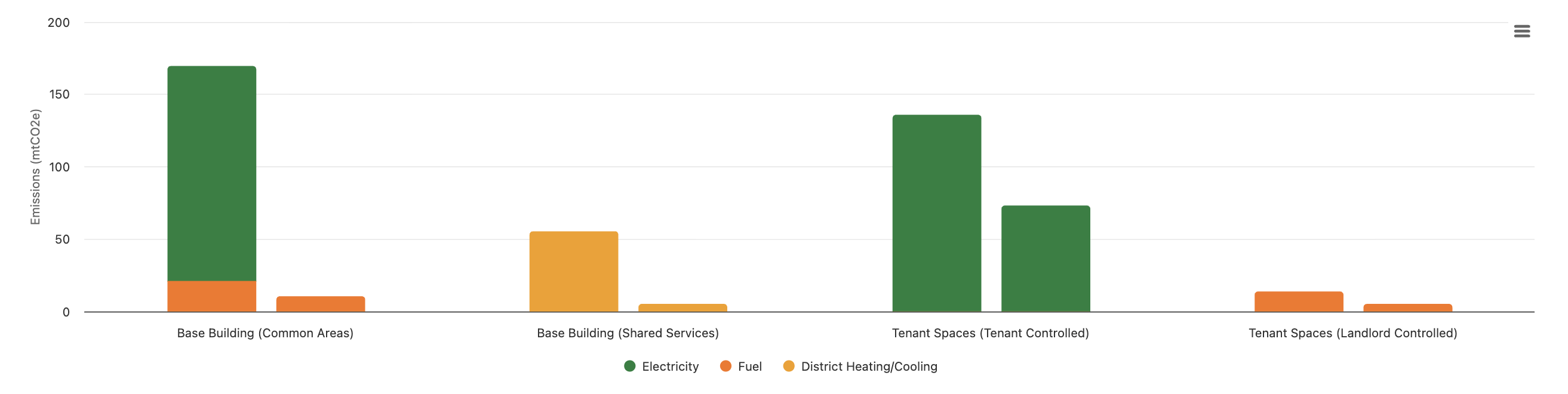
Monthly Emissions Use by Space Type
Monthly total emissions for each space type from the start of the base period to the end of the reporting period.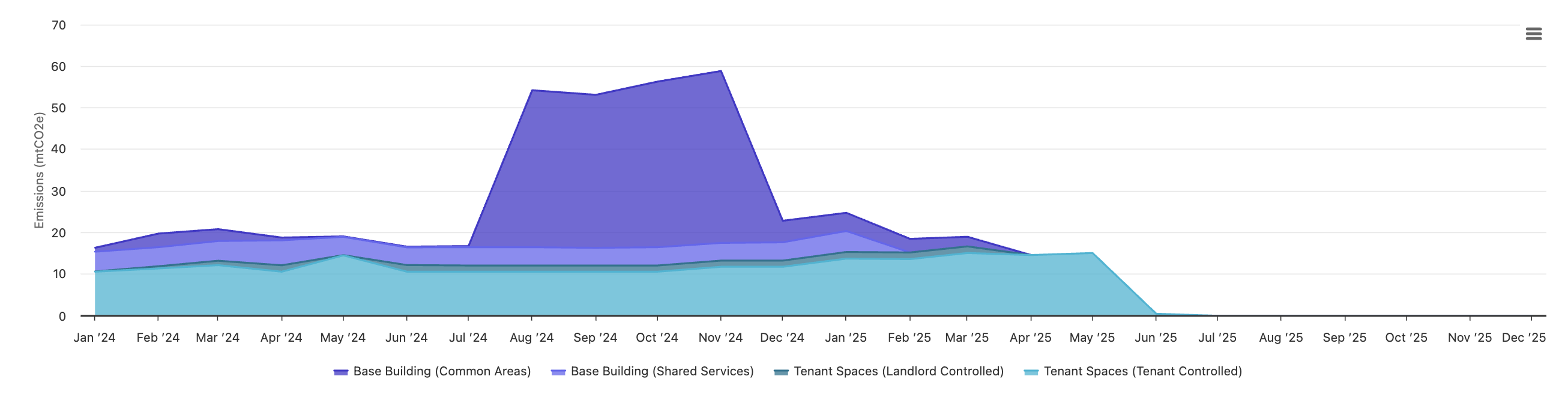
Base Building Annual Emissions Trends
Emissions, data completeness and coverage metrics for the base and reporting periods for Base Building (All), Common Areas and Shared Services space types.
Tenant Space Annual Emissions Trends
Emissions, data completeness and coverage metrics for the base and reporting periods for Tenant Spaces (All), Tenant Spaces - Landlord Controlled and Tenant Spaces - Tenant Controlled space types.
Portfolio Tracking
Navigate to Portfolio → Spaces → EmissionsConfigure Settings
Using the menu items, set the appropriate views- Base Period & Reporting Period
- Full Ownership: Include only properties that were owned over the entirety of base and reporting periods.
- Reporting Level: _Select _Emissions by Space Type
- Space type
- Emissions type
- Units: kgCO2e, mtCO2e, lbCO2e, tCO2e
Portfolio Data Coverage
- Above the table, a stat card displays the portfolio-level data coverage value for the selected space type and emissions type over the reporting period.
- Emissions type determines which energy meters to include in coverage calculations.
- Calculated by dividing the sum of Floor Area Coverage values for the selected space and energy type across all properties by the sum of Max Area Covered values.
- A warning icon is displayed if any errors are identified for across data coverage entries.

Performance Table
The table below hides properties by default for which the selected space type is explicitly marked by a user as not serviced by the energy type.
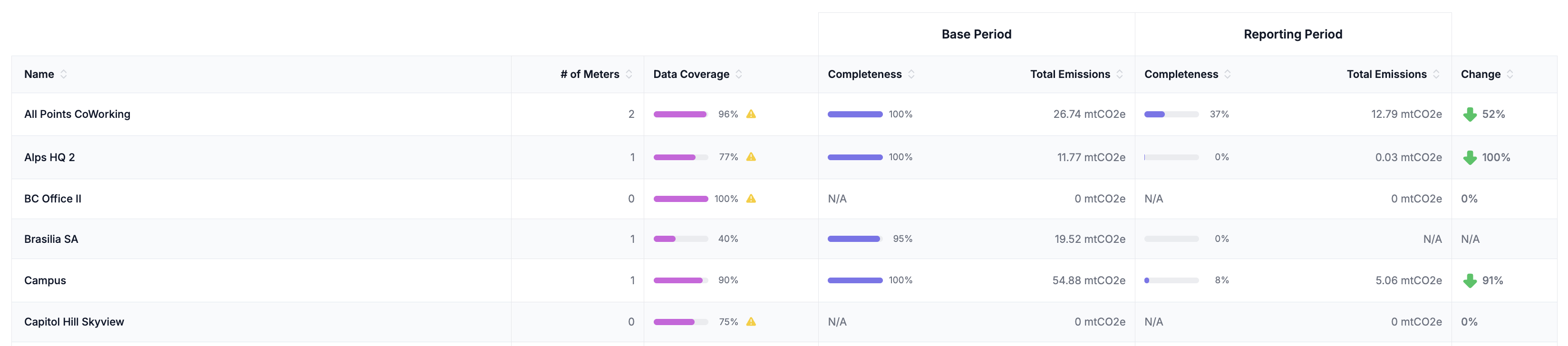
- Property Name: Each row in the table is for a different property
- # of Meters: The number of meters of the relevant energy type assigned to the space type
- Data Coverage: The property-level data coverage over the reporting period.
- Base Period Data Completeness: The total data completeness over the base period across all meters of the selected emissions type assigned to the selected space type.
- Base Period Consumption: The total consumption over the base period across all meters of the selected emissions type assigned to the selected space type.
- Reporting Period Data Completeness: The total data completeness over the reporting period across all meters of the selected emissions type assigned to the selected space type.
- Reporting Period Consumption: The total consumption over the reporting period across all meters of the selected emissions type assigned to the selected space type.
- Annual % Difference: The percent difference in total emissions from the base period to the reporting period.