

This report is based on a combination of Whole Building and Space-based analytics that depend on the Energy Reporting Level.
About the Report
- Reporting Period: Monthly and annual performance trends and consumption values are provided for each meter, property, and portfolio for the selected reporting period, as well as for the preceding 12 months.
- Properties: This report includes all properties associated with the portfolio that were owned at any time during the selected 12-month reporting period.
- Meters & Emissions: The property Energy Reporting Level determines which meters are included in this report and used to calculate scope 1,2,3 emissions.
- Whole Building (Landlord Controlled) → Scope 1 & Scope 2 emissions are driven by consumption from all in-metric meters and categorized based on energy type.
- Whole Building (Tenant Controlled) → Scope 3 emissions are driven by consumption from all in-metric meters and always categorized as Scope 3.
- Split (Landlord vs. Tenant) → Scope 1, Scope 2 and Scope 3 emissions are driven by consumption from all meters assigned to a space type and categorized by energy type.
Metrics & Trends
The following emissions metrics are included in this report with supporting metrics (e.g. green power) when applicable.EXCEL Tabs
The report is organized into multiple tabs that include monthly and annual trends across meters and properties, along with a portfolio-level summary.Portfolio Trends (Annual)
The Portfolio Trends (Annual) tab summarizes emissions trends across the entire portfolio. What you’ll find:- Annual emissions trends broken down by scope type for building and exterior spaces.
Property Trends (Annual)
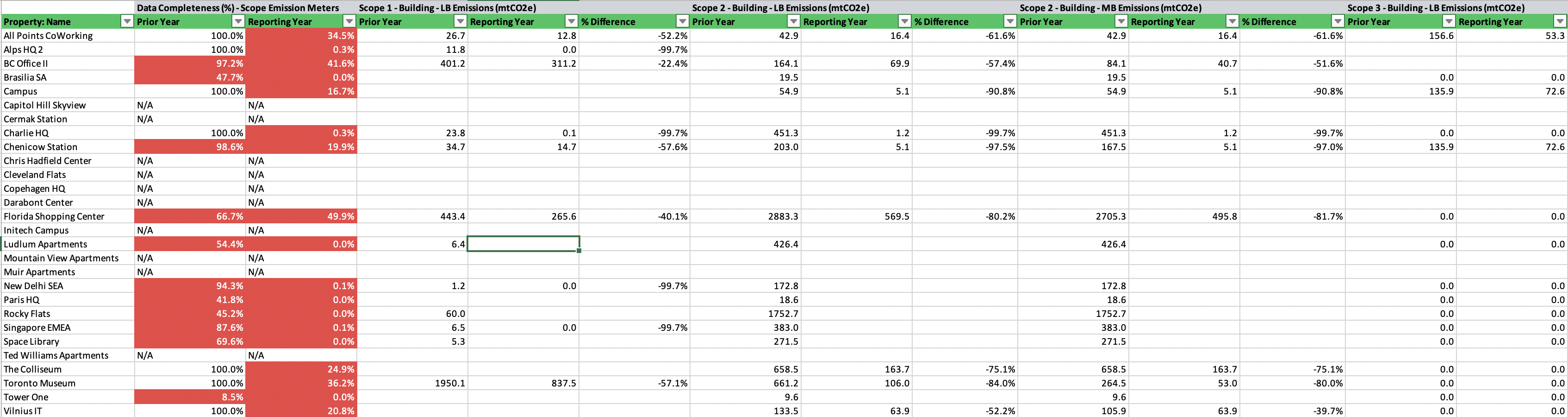
The Property Trends (Annual) tab shows annual emissions trends for each property in the portfolio. What you’ll find:- Property-level details
- Property Type, Ownership Period, Energy Reporting Level, etc.
- Annual emissions values broken down by scope type for building and exterior spaces:
- Annual data quality metrics for each property
- Data Completeness (%)
Property Trends (Monthly)
The Property Trends (Monthly) tab provides month-by-month emissions trends for each property. What you’ll find:- Property-level details
- Monthly emissions values broken down by scope type for building and exterior spaces.
- Trends over 24 consecutive months
Meter Trends (Annual)
The Meter Trends (Annual) tab presents annual energy use and data quality metrics for every meter and property in the portfolio, regardless of meter assignment or in-metric status. What you’ll find:- Meter-level details
- Activation periods, Date last updated, Meter type/subtype, Space assignment, etc.
- Year-over-year energy use trends for each meter
- Year-over-year emissions trends for each meter
- Annual data quality metrics for each meter
- Data Completeness (%)
- Specific Gaps over 24-month period
- Specific Overlaps over 24-month period
Meter Trends (Monthly)
The Meter Trends (Monthly) tab shows detailed monthly data for every meter and property in the portfolio, regardless of meter assignment or in-metric status. What you’ll find:- Meter-level details
- Activation periods, Date last updated, Meter type/subtype, Space assignment, etc.
- Month-over-month energy use trends for each meter
- Month-over-month emissions values for each meter
- Monthly data quality metrics for each meter
- Months with Jumps from Previous Year
- Data coverage events