

Overview
The Colorado Building Performance Standard sets EUI and GHGi performance targets for large buildings that must be met by 2030.New legislation (HB25-1269) was passed in April 2025 to update BPS rules.
BPS Resources
Filing & Reporting
The reporting period deadline was recently updated to be November 1 each year. In order to be in compliance with the BPS, building owners must submit documentation showing they met their target by November 1 following the compliance year (e.g. November 1, 2031 for the 2030 target).- Large buildings (GFA > 50,000 ft2): Commercial and multifamily buildings
Configuration
Follow these steps to ensure that the property is ready for compliance analysis:- Confirm the selected Reporting Period: Emissions calculations, penalty values, and decarb pathways all depend on the selected reporting period. Change the reporting period to see how property performance over different 12-month time frames impacts compliance.
- Click on Details button to ensure that there is a high Data Completeness value associated with the reporting period. Data completeness should be as close to 100% as possible to ensure accurate analysis.
Calculating EUI Targets
A building’s EUI target is based on the compliance pathway selected for the property. Building owners must select a compliance pathway they intend to follow to achieve their target via this Compliance Pathway Selection tool.Abisko currently supports EUI-based pathways for Colorado. GHGi-based pathways coming soon.
Standard (Energy Efficiency) Pathway
A building’s EUI target is based on the breakdown of its property uses as tracked in ESPM. Abisko automatically calculates a property’s EUI targets and transparently displays each step of the calculation process, as described below.ESPM Property Uses
Abisko displays all ESPM property uses of the property along with associated floor areas and Colorado EUI targets in a table near the bottom of the report. Click here to see a list of all property use types and associated target EUI values (Appendix A).Property Use Type Adjustments
Properties for which more than 50% of the gross floor area consists of a single property use type can report as a single-use building when calculting the EUI target. Abisko automatically reallocates all property use floor area to the use type that accounts for at least 50% of the building’s total gross floor area. The EUI target associated with that use type is then applied to the entire building.
Final EUI Target
The total EUI target is calculated by taking the weighted average of the EUI targets associated with all property use types. 𝐵 = ( Σ𝑙𝑘∙𝑠𝑘) / Σ𝑙𝑘- B = the total building EUI target for a building with multiple property use types
- 𝑠𝑘= the EUI target associated with property use type, k
- 𝑙𝑘= the total adjusted floor area of property use type, k
Percent Reduction Pathway
A flat percent reduction option is available for buildings that are not able to achieve the site EUI target for their property type, or for buildings with property types that do not have associated EUI targets. This standard percent reduction pathway allows buildings to reduce their site EUI 13% by 2026 (reference target) and 29% by 2030 (compliance target), as measured against their baseline. Baseline Value Building owners can choose to use a 2019 or 2021 baseline against which their 29% reduction target is applied against. Abisko allows users to choose either option to see how it impacts a property’s compliance pathway.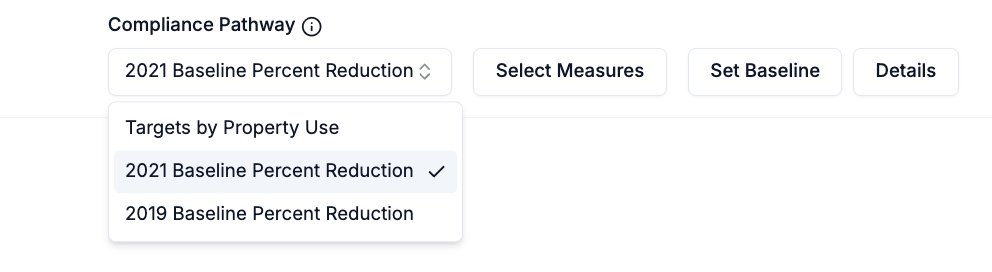

- 2026 Target: Baseline_EUI * 87% (Represents a 13% reduction from baseline)
- 2030 Target: Baseline_EUI * 71% (Represents a 29% reduction from baseline)
Calculating Penalties
Non-compliance penalties are assessed based on whether a building’s total EUI exceeds its target for a given year, regardless of how far the EUI exceeds the target.While Colorado uses the ESPM WN Site EUI metric for the baseline, Abisko uses the ESPM Site EUI metric to enable a direct comparison against reporting period Site EUI. This approach allows analysis even in cases of incomplete data, which ESPM metrics do not support.

Setting Custom Baselines
Abisko automatically calculates EUI targets using the default methodology outlined in published technical guidance. In some cases, however, buildings may be subject to alternative prescribed baselines, or users may wish to evaluate non-compliance penalties under different baseline and target assumptions. To support these use cases, Abisko allows users to define custom EUI baselines & targets for the property. Once a custom value is applied, Abisko automatically recalculates all compliance metrics and penalty estimates. If no custom values are defined, Abisko uses the default calculated values.To Add/Edit/Delete Custom Targets or Baselines
Property → Compliance → Exposure → Colorado BPS- Click on the Set Targets or Set Baseline button
- Open the sidebar
- To add/edit a custom value
- Hover the mouse over the row in the table for the value you would like to edit
- Click the edit icon that shows itself on the right side
- Edit the value and save
- To delete a custom value
- Hover the mouse over the row in the table for the value you would like to delete
- Click the trash icon that shows itself on the right side to delete
- To add/edit a custom value
Compliance Pathways
Abisko enables users to evaluate the impact of proposed energy measures on a property’s EUI over time. Users can model different combinations of measures and see how each scenario affects the EUI and non-compliance penalties through 2040. This functionality allows users to align long-term decarbonization strategies with BPS requirements and capital planning efforts. With this feature, users can:- Test different energy efficiency pathways and their impacts on regulatory exposure
- Identify the most cost-effective compliance strategies
- Prepare and submit non-compliance mitigation plans to local regulators
Select Measures
Property → Compliance → Exposure → Colorado BPS- Click on the Select Measures button
-
Open the Measures Selection sidebar
- Check the box next to each measure that should be included in the compliance analysis
- Check the box above the table to automatically select all measures
- Click save after finalizing the measure selection
- Check the box next to each measure that should be included in the compliance analysis
Review Charts & Tables
After saving all selected measures, all charts and tables in the report will automatically update to show the impact of each measure on the property’s EUI and non-compliance penalties.- Proposed measure impacts will begin to take effect on the calendar year following the completion date of the measure.
- e.g. if completion date = 5/5/2028, changes begin to take effect 2029
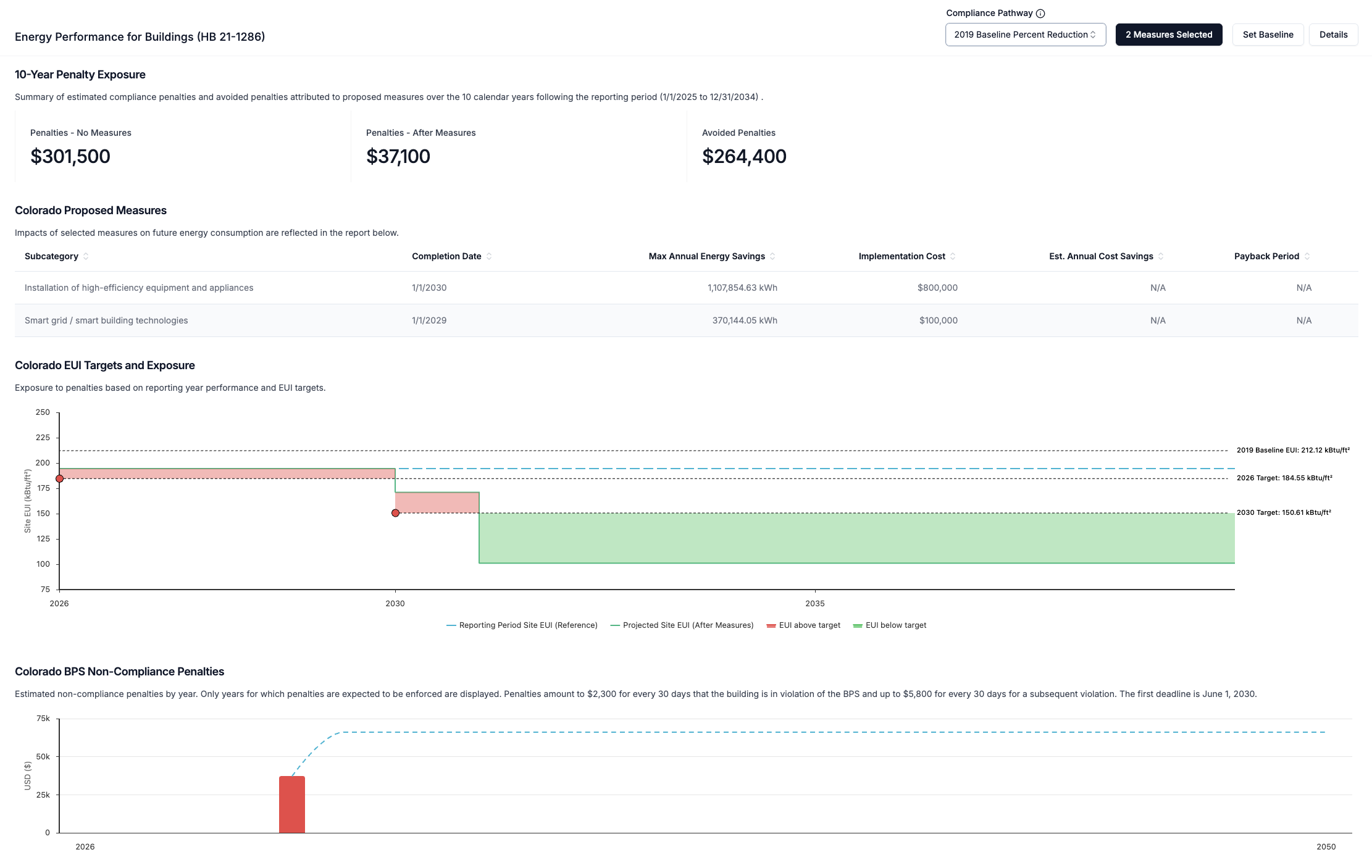
- Absolute values entered for each energy subtype (e.g. electric, natural gas) are subtracted from the total annual consumption of that subtype for the selected reporting period.
- Percentage values entered for each energy subtype are converted to absolute values by multiplying the percentage by the total annual consumption of that subtype for the selected reporting period. The converted value is then treated as an absolute value.
- Measures are applied independently (no interactive effects) and total reductions for each energy subtype are capped by the total subtype consumption of the reporting period.
- e.g. If 20 measures include 10% annual electricity savings, this will be capped to 100% annual electricity savings, resulting in 0 electricity-related emissions
- Annual energy savings are additive and persist over time