Navigate to Portfolio → Reports → ESPM
This report is based on ESPM Metrics and in-metric meters associated with each property.
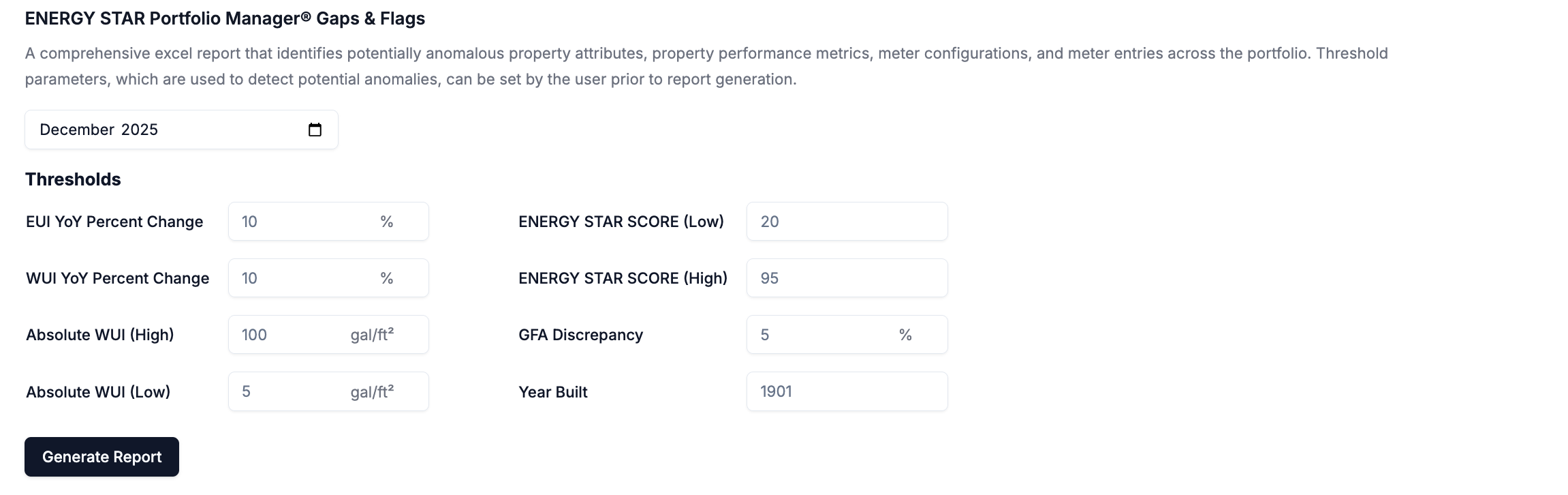
This report identifies potentially anomalous property attributes, property performance metrics, meter configurations, and meter entries across the portfolio. Threshold parameters, which are used to detect potential anomalies, can be set by the user prior to report generation. Screenshot 2026 01 17 At 4 36 01 PM
  • User defined thresholds are used to flag anomalies in the report, which are highlighted in red.

About the Report

  • Reporting Period: Annual ESPM property metrics and meter consumption values are provided for the selected reporting period and the preceding year.
  • Properties: This report includes all properties associated with the portfolio that were owned at any time during the selected 12-month reporting period.
  • Meters: This report includes whole building performance and data quality metrics driven by all in-metric meters associated with the included properties.
  • Performance Metrics: All performance metrics in the report reflect those reported by ESPM. These are often reported as N/A if there are any issues associated with data. Learn more.

EXCEL Tabs

The report is organized into multiple tabs.

Property Performance Flags

This tab analyzes ESPM property performance metrics and includes the following checks:
Property FlagsMetrics & Checks
Flags: Property DetailsProperty: GFA Match (ESPM)
Property: Abnormal Year Built
Flags: EnergyEnergy: High or Low ENERGY STAR Score
Energy: High or Low Site EUI - Prior Year
Energy: High or Low Site EUI - Reporting Year
Energy: Anomalous YoY EUI % Change
Flags: WaterWater: High or Low WUI - Prior Year
Water: High or Low WUI - Reporting Year
Water: Anomalous YoY WUI % Change

Property Coverage Flags

This tab analyzes ESPM property performance metrics and includes the following checks:
Property FlagsMetrics & Checks
Flags: EnergyEnergy: In-metric Meters with Gaps
Energy: In-metric Meters with Overlaps
Energy: Baseline Date
Energy: Data Not Up to Date Through [Date]
Energy: No Meters included in Metrics
Energy: Meter Coverage - ESPM
Energy: Active Meter Not Included in Metrics
Energy: Inactive Meter Included in Metrics
Flags: WaterWater: Data Completeness - All In-metric Meters
Water: In-metric Meters with Gaps
Water: In-metric Meters with Overlaps
Water: Data Not Up to Date Through [Date]
Water: Meter Coverage - ESPM
Flags: WasteWaste: Data Not Up to Date Through [Date]

Energy Meter Flags

This tab analyzes ESPM meter-level consumption and trends and includes the following checks:
Meter-level Flags & Checks
Available Days
# of Gap Days
Data Completeness
Gaps
Overlaps
Meter Has No Entries Flag
Active Meter Not Current Flag (12/31/2025)
Entry Before Start Date Flag
Entry After Deactivation Date Flag
Active Meter Not in Metrics Flag
Inactive Meter in Metrics Flag

Water Meter Flags

This tab analyzes ESPM meter-level consumption and trends and includes the following checks:
Meter-level Flags & Checks
Available Days
# of Gap Days
Data Completeness
Gaps
Overlaps
Meter Has No Entries Flag
Active Meter Not Current Flag (12/31/2025)
Entry Before Start Date Flag
Entry After Deactivation Date Flag
Active Meter Not in Metrics Flag
Inactive Meter in Metrics Flag

Waste Meter Flags

This tab analyzes ESPM meter-level consumption and trends and includes the following checks:
Meter-level Flags & Checks
Meter Has No Entries Flag
Active Meter Not Current Flag (12/31/2025)
Entry Before Start Date Flag
Entry After Deactivation Date Flag
Active Meter Not in Metrics Flag
Inactive Meter in Metrics Flag