> ## Documentation Index
> Fetch the complete documentation index at: https://docs.abisko.io/llms.txt
> Use this file to discover all available pages before exploring further.
# Emissions
> Emissions metrics & calculations across spaces.
Users can track emissions trends across different space types within properties and across portfolios. Space-based analytics support a deeper level of decarbonization planning that differentiates between landlord and tenant-based strategies and allows users to take more targeted action to reduce Scope 1, Scope 2 and Scope 3 emissions.
## Performance Metrics
Users can track and report emissions for each space type and energy type.
| Space Type | Consumption, Completeness, Coverage |
| :------------------------------------------------- | :----------------------------------- |
| Base Building (All) | Total Emissions |
| Base Building (All) | Electricity Emissions |
| Base Building (All) | Fuel Emissions |
| Base Building (All) | District Heating & Cooling Emissions |
| Base Building - Common Areas | Total Emissions |
| Base Building - Common Areas | Electricity Emissions |
| Base Building - Common Areas | Fuel Emissions |
| Base Building - Common Areas | District Heating & Cooling Emissions |
| Base Building - Shared Services | Total Emissions |
| Base Building - Shared Services | Electricity Emissions |
| Base Building - Shared Services | Fuel Emissions |
| Base Building - Shared Services | District Heating & Cooling Emissions |
| Tenant Spaces (All) | Total Emissions |
| Tenant Spaces (All) | Electricity Emissions |
| Tenant Spaces (All) | Fuel Emissions |
| Tenant Spaces (All) | District Heating & Cooling Emissions |
| Tenant Spaces - Landlord Controlled | Total Emissions |
| Tenant Spaces - Landlord Controlled | Electricity Emissions |
| Tenant Spaces - Landlord Controlled | Fuel Emissions |
| Tenant Spaces - Landlord Controlled | District Heating & Cooling Emissions |
| Tenant Spaces - Tenant Controlled | Total Emissions |
| Tenant Spaces - Tenant Controlled | Electricity Emissions |
| Tenant Spaces - Tenant Controlled | Fuel Emissions |
| Tenant Spaces - Tenant Controlled | District Heating & Cooling Emissions |
| Outdoor / Exterior / Parking (All) | Total Emissions |
| Outdoor / Exterior / Parking - Landlord Controlled | Total Emissions |
| Outdoor / Exterior / Parking - Tenant Controlled | Total Emissions |
| EV Charging | Total Emissions |
## Meter Assignments
To enable [space-based performance](/spaces/performance) tracking and [Scope 1, 2, and 3 emissions reporting](/performance/scope-emissions), energy meters must be assigned to their appropriate space types. All meters, regardless of whether they are in-metric or out-of-metric, can be assigned to space types.
[Click here](/meters/meter-space-assignments) to learn how to assign meters to spaces.
## Methodology
The methodology for calculating emissions for each space type and energy type is similar to that used for calculating whole building location-based emissions, except that all meters assigned to a space type are included in calculations, regardless of in-metric status.
[Click here](/performance/location-emissions) to view the methodology for calculating whole building location-based emissions.
Space-based emissions are reported independently for each space type and differ from Scope 1,2,3 emissions, which are reported at the whole building level despite being driven by space-based categorizations.
## **Property Tracking**
**Navigate to Property → Spaces → Emissions → 'Emissions by Space Type'**
### Configure Settings
Using the bottoms located at the top-right, confirm all spaces and meter assignments.
* **Assign Meters:** [Click here](/meters/meter-space-assignments) to learn more.
* **Units**
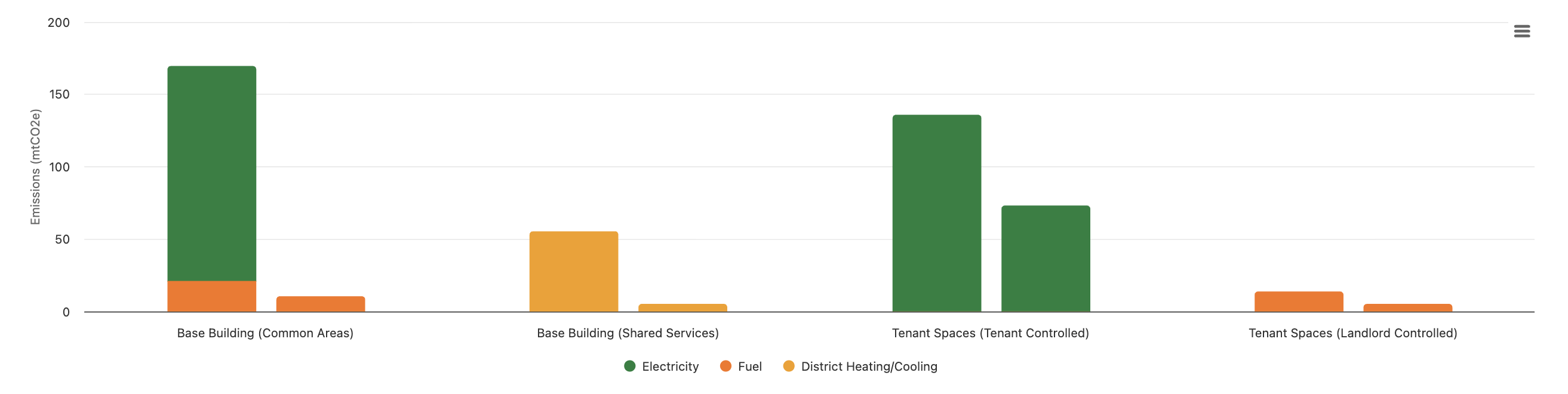
### Annual Emissions Use by Space Type
Changes in emissions from the base period to the reporting period by space type, broken down by energy type.
 ### Monthly Emissions Use by Space Type
Monthly total emissions for each space type from the start of the base period to the end of the reporting period.
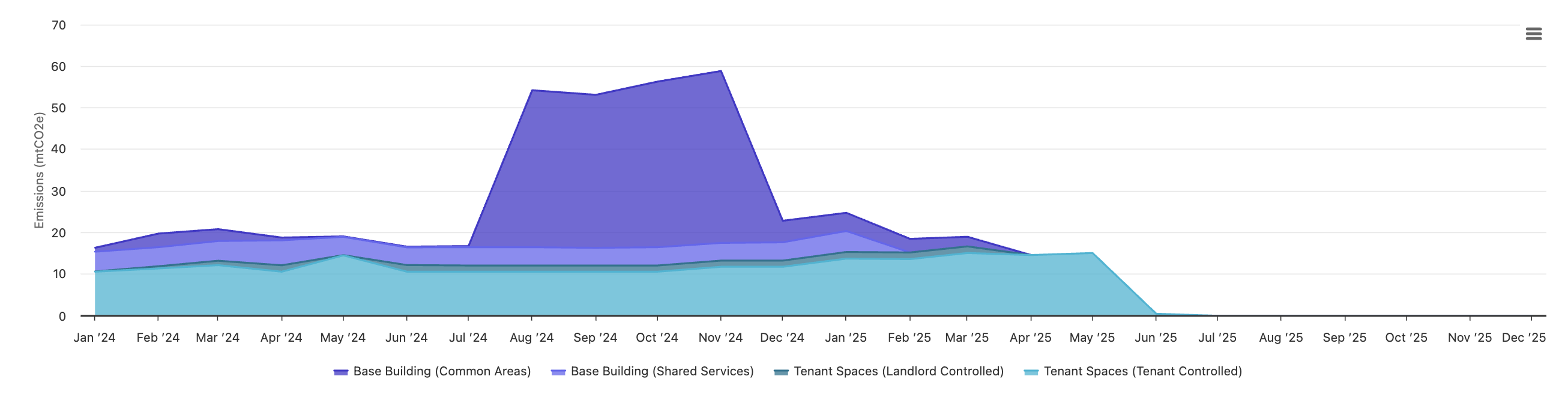
### Monthly Emissions Use by Space Type
Monthly total emissions for each space type from the start of the base period to the end of the reporting period.
 ### Base Building Annual Emissions Trends
Emissions, data completeness and coverage metrics for the base and reporting periods for **Base Building (All)**, **Common Areas** and **Shared Services** space types.
### Base Building Annual Emissions Trends
Emissions, data completeness and coverage metrics for the base and reporting periods for **Base Building (All)**, **Common Areas** and **Shared Services** space types.
 ### Tenant Space Annual Emissions Trends
Emissions, data completeness and coverage metrics for the base and reporting periods for **Tenant Spaces (All)**, **Tenant Spaces - Landlord Controlled** and **Tenant Spaces - Tenant Controlled** space types.
### Tenant Space Annual Emissions Trends
Emissions, data completeness and coverage metrics for the base and reporting periods for **Tenant Spaces (All)**, **Tenant Spaces - Landlord Controlled** and **Tenant Spaces - Tenant Controlled** space types.
 ## **Portfolio Tracking**
**Navigate to Portfolio → Spaces → Emissions**
### Configure Settings
Using the menu items, set the appropriate views
* **Base Period & Reporting Period**
* **Full Ownership**: *Include only properties that were owned over the entirety of base and reporting periods.*
* **Reporting Level**: \_Select \_***Emissions by Space Type***
* **Space type**
* **Emissions type**
* **Units:** *kgCO2e, mtCO2e, lbCO2e, tCO2e*
### Portfolio Data Coverage
* Above the table, a stat card displays the portfolio-level data coverage value for the selected space type and emissions type over the reporting period.
* Emissions type determines which energy meters to include in coverage calculations.
* Calculated by dividing the sum of **Floor Area Coverage** values for the selected space and energy type across all properties by the sum of **Max Area Covered** values.
* A warning icon is displayed if any errors are identified for across data coverage entries.
## **Portfolio Tracking**
**Navigate to Portfolio → Spaces → Emissions**
### Configure Settings
Using the menu items, set the appropriate views
* **Base Period & Reporting Period**
* **Full Ownership**: *Include only properties that were owned over the entirety of base and reporting periods.*
* **Reporting Level**: \_Select \_***Emissions by Space Type***
* **Space type**
* **Emissions type**
* **Units:** *kgCO2e, mtCO2e, lbCO2e, tCO2e*
### Portfolio Data Coverage
* Above the table, a stat card displays the portfolio-level data coverage value for the selected space type and emissions type over the reporting period.
* Emissions type determines which energy meters to include in coverage calculations.
* Calculated by dividing the sum of **Floor Area Coverage** values for the selected space and energy type across all properties by the sum of **Max Area Covered** values.
* A warning icon is displayed if any errors are identified for across data coverage entries.
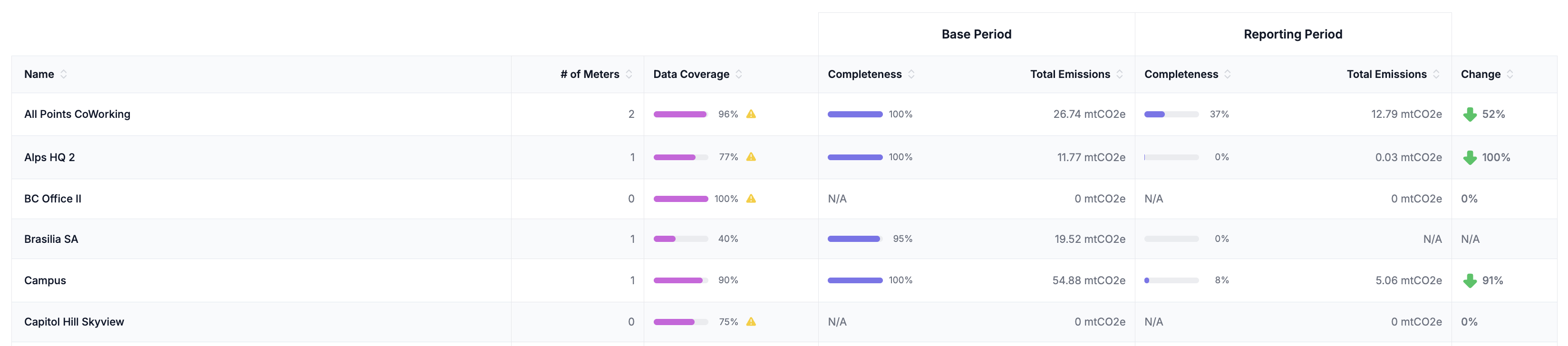
 ### Performance Table
The table below hides properties by default for which the selected space type is explicitly marked by a user as not serviced by the energy type.
* **Property Name:** *Each row in the table is for a different property*
* **# of Meters:** *The number of meters of the relevant energy type assigned to the space type*
* **Data Coverage:** *The property-level data coverage over the reporting period.*
* **Base Period Data Completeness:** *The total data completeness over the base period across all meters of the selected emissions type assigned to the selected space type.*
* **Base Period Consumption:** *The total consumption over the base period across all meters of the selected emissions type assigned to the selected space type.*
* **Reporting Period Data Completeness:** *The total data completeness over the reporting period across all meters of the selected emissions type assigned to the selected space type.*
* **Reporting Period Consumption:** *The total consumption over the reporting period across all meters of the selected emissions type assigned to the selected space type.*
* **Annual % Difference:** *The percent difference in total emissions from the base period to the reporting period.*
Sort the colums of the table to quickly identify performance and data coverage outliers across all properties.
### Performance Table
The table below hides properties by default for which the selected space type is explicitly marked by a user as not serviced by the energy type.
* **Property Name:** *Each row in the table is for a different property*
* **# of Meters:** *The number of meters of the relevant energy type assigned to the space type*
* **Data Coverage:** *The property-level data coverage over the reporting period.*
* **Base Period Data Completeness:** *The total data completeness over the base period across all meters of the selected emissions type assigned to the selected space type.*
* **Base Period Consumption:** *The total consumption over the base period across all meters of the selected emissions type assigned to the selected space type.*
* **Reporting Period Data Completeness:** *The total data completeness over the reporting period across all meters of the selected emissions type assigned to the selected space type.*
* **Reporting Period Consumption:** *The total consumption over the reporting period across all meters of the selected emissions type assigned to the selected space type.*
* **Annual % Difference:** *The percent difference in total emissions from the base period to the reporting period.*
Sort the colums of the table to quickly identify performance and data coverage outliers across all properties.