> ## Documentation Index
> Fetch the complete documentation index at: https://docs.abisko.io/llms.txt
> Use this file to discover all available pages before exploring further.
# ESPM Sharing
> How to share your ESPM properties with Abisko via Energy Star Portfolio Manager.
***
## Sharing Properties with Abisko
To sync ESPM properties with Abisko, you need to share them through Energy Star Portfolio Manager. This two-step process is described below.
## Step 1: Add Abisko as a Contact
Go to [portfoliomanager.energystar.gov](https://portfoliomanager.energystar.gov) and sign in.
Go to [Contacts](https://portfoliomanager.energystar.gov/pm/contact/add?execution=e1s1) in ESPM.
In the search field, type "Abisko" and click **Connect**.
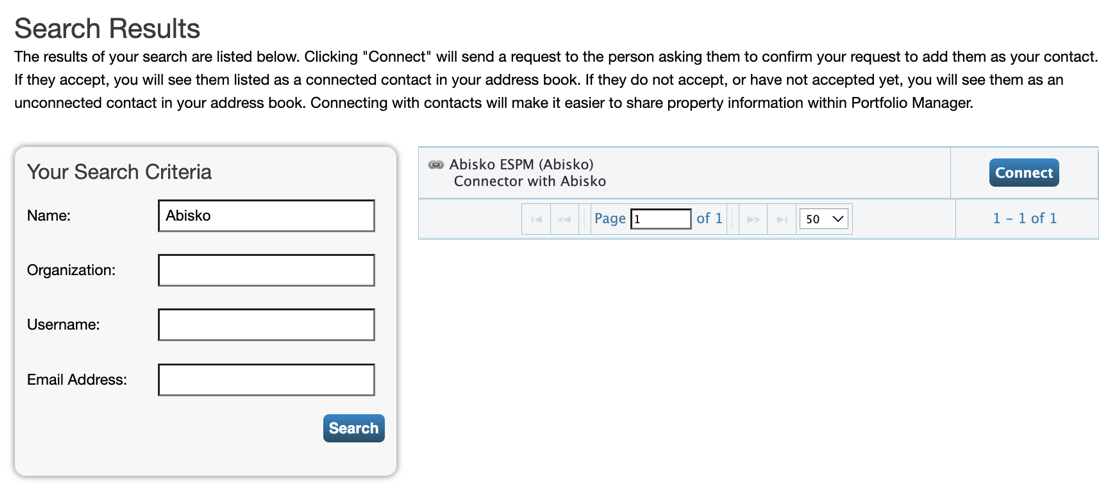 Let Abisko know you've sent a connection request so we can accept it.
## Step 2: Share Properties in Bulk
This step can only be completed after the ESPM Contact request has been accepted by Abisko.
Navigate to the [Bulk Sharing page](https://portfoliomanager.energystar.gov/pm/sharing/wsBulkSharing) in ESPM.
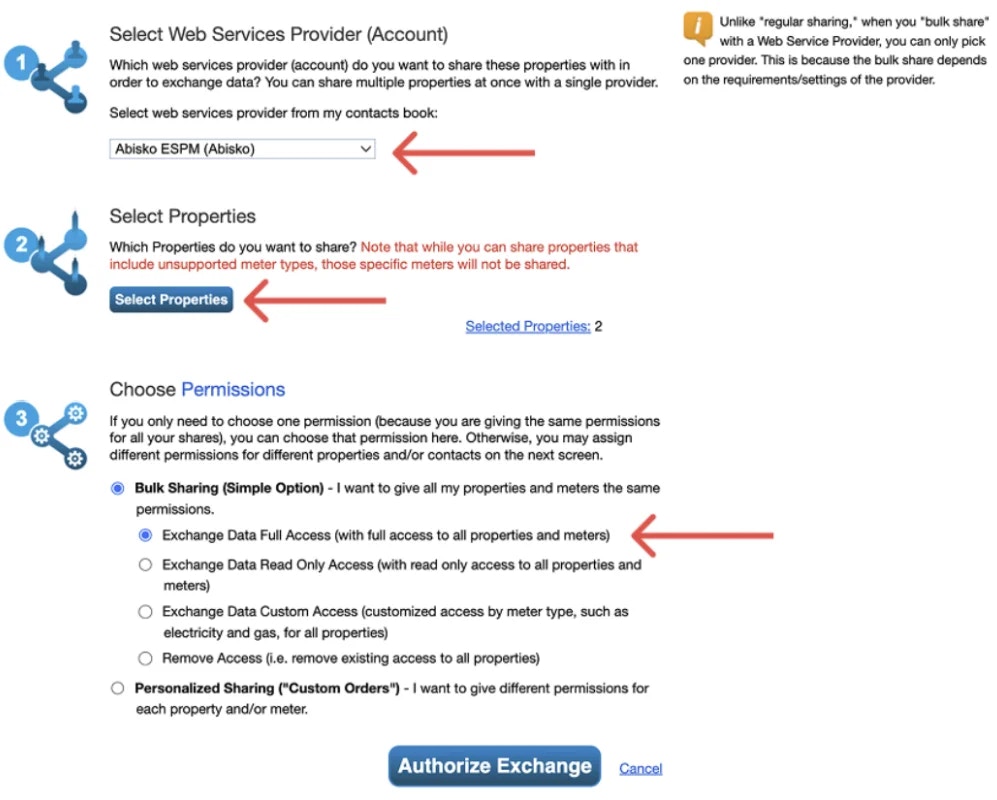
Select **Abisko ESPM (Abisko)** in the dropdown labeled "Select web services provider from my contacts book"
Click **Select Properties** and check all the properties you want to share with Abisko.
Select **Bulk Sharing (Simple Option)** and choose **Exchange Data Full Access**
Click **Authorize Exchange**.
Let Abisko know you've shared properties so we can accept the shares.
Let Abisko know you've sent a connection request so we can accept it.
## Step 2: Share Properties in Bulk
This step can only be completed after the ESPM Contact request has been accepted by Abisko.
Navigate to the [Bulk Sharing page](https://portfoliomanager.energystar.gov/pm/sharing/wsBulkSharing) in ESPM.
Select **Abisko ESPM (Abisko)** in the dropdown labeled "Select web services provider from my contacts book"
Click **Select Properties** and check all the properties you want to share with Abisko.
Select **Bulk Sharing (Simple Option)** and choose **Exchange Data Full Access**
Click **Authorize Exchange**.
Let Abisko know you've shared properties so we can accept the shares.
 ***
## Once Abisko accepts your property shares
* ESPM data will begin syncing automatically every night.
* Abisko will configure your portfolio & provide you login credentials.
Data syncs every night. Any updates you make in ESPM will appear in Abisko the following day.
***
## How-to Recording: Share ESPM with Abisko
See how to share properties with Abisko in ESPM
***
## Once Abisko accepts your property shares
* ESPM data will begin syncing automatically every night.
* Abisko will configure your portfolio & provide you login credentials.
Data syncs every night. Any updates you make in ESPM will appear in Abisko the following day.
***
## How-to Recording: Share ESPM with Abisko
See how to share properties with Abisko in ESPM