> ## Documentation Index
> Fetch the complete documentation index at: https://docs.abisko.io/llms.txt
> Use this file to discover all available pages before exploring further.
# EXCEL Data Quality Reports
> Export reports that detail data quality issues across a portfolio.
Abisko provides a number of comprehensive EXCEL data quality and performance reports that highlight gaps, overlaps, jumps, high & low values and completeness metrics across meters, properties and portfolios.
These reports can be generated on-demand for any reporting period and enable teams to conduct advanced analysis outside of the Abisko platform.
## EXCEL Reports
### **Portfolio Performance & Data Quality Report**
**Navigate to Portfolio → Reports → Performance**
A comprehensive excel report that includes annual and monthly consumption trends and data quality metrics across the portfolio, properties, and in-metric meters.
**Property-level**
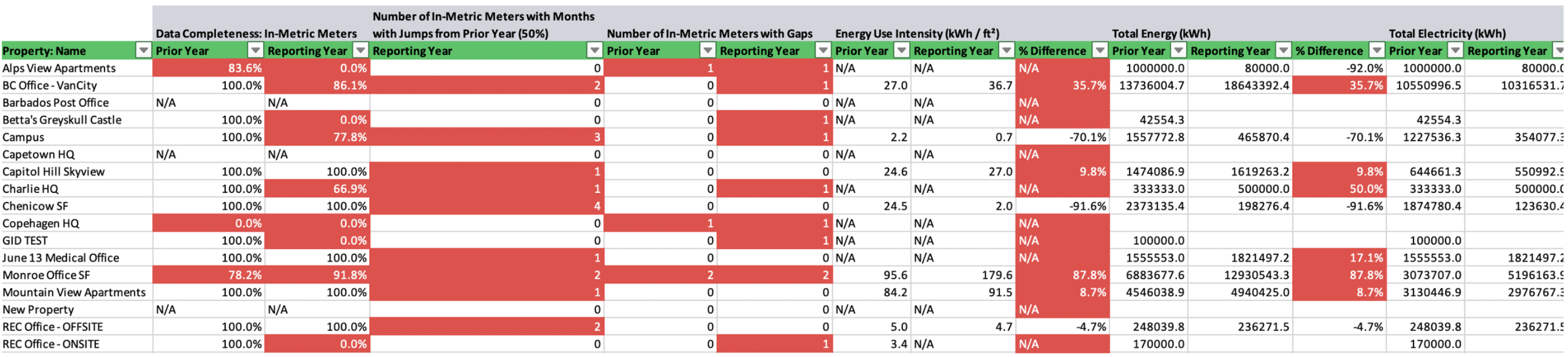
The property level tabs in the EXCEL report include the following data quality insights:
* Whole Building (in-metric) Data Completeness
* Number of In-Metric Meters with Months with Jumps from Prior Year (50%)
* Number of In-Metric Meters with Gaps
* Number of In-Metric Meters with Overlaps
| **Energy Metric** | **Emissions Metric** |
| :---------------------------- | :------------------------------------------- |
| ENERGY STAR Score | Total (Location-Based) Emissions |
| Energy Use Intensity | Total (Location-Based) Emissions Intensity |
| Total Energy | Total (Market-Based) Emissions |
| Total Electricity | Total (Market-Based) Emissions Intensity |
| Green Power - Total Onsite | Direct Emissions |
| Green Power - Total Offsite | Indirect (Location-Based) Emissions |
| Total Fuel | Indirect (Market-Based) Emissions |
| Total District Heat & Cooling | |
 **Meter-level**
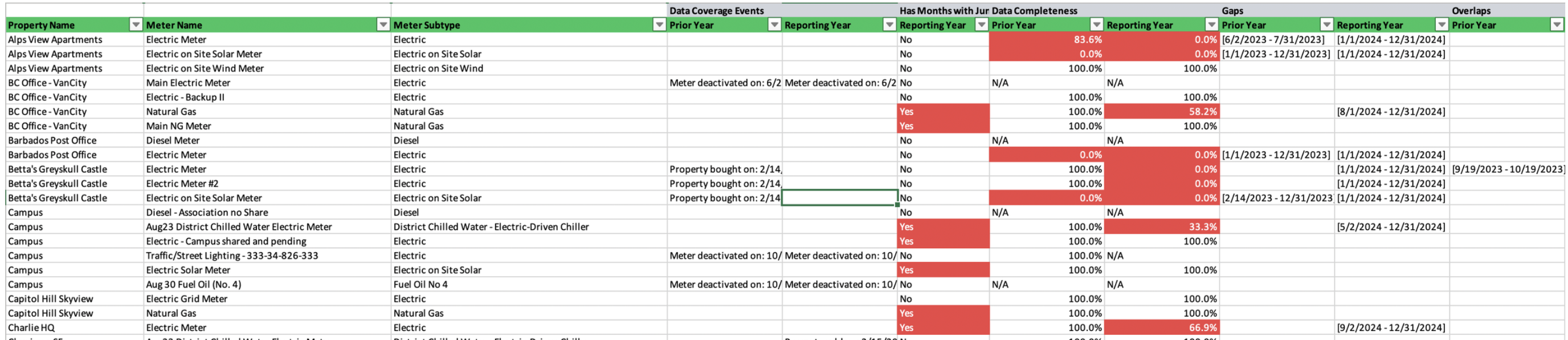
The meter level tabs in the EXCEL report include the following data quality insights:
* Data Coverage Events
* Data Completeness
* Specific Monthly Jumps from Prior Year
* Specific Gaps
* Specific Overlaps
* Total Energy & percent changes
* Total Emissions & percent changes
**Meter-level**
The meter level tabs in the EXCEL report include the following data quality insights:
* Data Coverage Events
* Data Completeness
* Specific Monthly Jumps from Prior Year
* Specific Gaps
* Specific Overlaps
* Total Energy & percent changes
* Total Emissions & percent changes
 ### Landlord vs. Tenant Performance Report
**Navigate to Portfolio → Reports → Performance**
A comprehensive excel report that includes annual and monthly consumption trends and data quality metrics across the portfolio, property spaces types (e.g. landlord vs. tenant) and all in-metric and out-of-metric meters.
**Property-level**
The property level tabs in the EXCEL report include the following data quality insights:
* Data Completeness (%): All Meters with Assigned Spaces
* Number of Assigned Meters with Months with Jumps from Prior Year (50%)
* Number of Assigned Meters with Gaps
* Number of Assigned Meters with Overlaps
* Total Energy - (Assigned) Base Building (Common Areas)
* Total Energy - (Assigned) Base Building (Shared Services)
* Total Energy - (Assigned) Tenant Spaces (Landlord Controlled)
* Total Energy - (Assigned) Tenant Spaces (Tenant Controlled)
* Total Energy - (Assigned) Outdoor / Exterior Areas / Parking Landlord Controlled
* Total Energy - (Assigned) Outdoor / Exterior Areas / Parking Tenant Controlled
* Total Energy - (Assigned) EV Charging
**Meter-level**
The meter level tabs in the EXCEL report include the following data quality insights:
* Data Coverage Events
* Monthly Jumps from Prior Year
* Data Completeness (%)
* Specific Gaps
* Specific Overlaps
* Total Energy
* Green Power - Total Onsite
* Total Location-based Emissions
### ENERGY STAR Portfolio Manager® Gaps & Flags Report
**Navigate to Portfolio → Reports → ESPM**
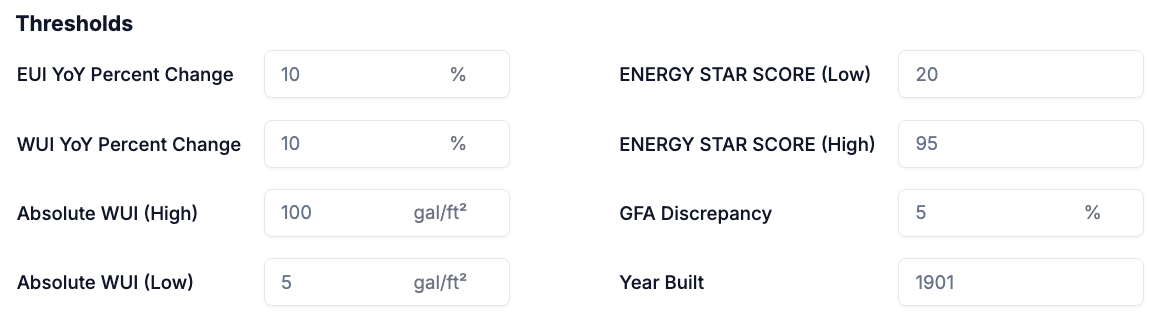
A comprehensive excel report that identifies potentially anomalous (e.g. high or low) property attributes, property performance metrics, meter configurations, and meter entries across the portfolio. Threshold parameters, which are used to detect potential anomalies, can be set by the user prior to report generation.
### Landlord vs. Tenant Performance Report
**Navigate to Portfolio → Reports → Performance**
A comprehensive excel report that includes annual and monthly consumption trends and data quality metrics across the portfolio, property spaces types (e.g. landlord vs. tenant) and all in-metric and out-of-metric meters.
**Property-level**
The property level tabs in the EXCEL report include the following data quality insights:
* Data Completeness (%): All Meters with Assigned Spaces
* Number of Assigned Meters with Months with Jumps from Prior Year (50%)
* Number of Assigned Meters with Gaps
* Number of Assigned Meters with Overlaps
* Total Energy - (Assigned) Base Building (Common Areas)
* Total Energy - (Assigned) Base Building (Shared Services)
* Total Energy - (Assigned) Tenant Spaces (Landlord Controlled)
* Total Energy - (Assigned) Tenant Spaces (Tenant Controlled)
* Total Energy - (Assigned) Outdoor / Exterior Areas / Parking Landlord Controlled
* Total Energy - (Assigned) Outdoor / Exterior Areas / Parking Tenant Controlled
* Total Energy - (Assigned) EV Charging
**Meter-level**
The meter level tabs in the EXCEL report include the following data quality insights:
* Data Coverage Events
* Monthly Jumps from Prior Year
* Data Completeness (%)
* Specific Gaps
* Specific Overlaps
* Total Energy
* Green Power - Total Onsite
* Total Location-based Emissions
### ENERGY STAR Portfolio Manager® Gaps & Flags Report
**Navigate to Portfolio → Reports → ESPM**
A comprehensive excel report that identifies potentially anomalous (e.g. high or low) property attributes, property performance metrics, meter configurations, and meter entries across the portfolio. Threshold parameters, which are used to detect potential anomalies, can be set by the user prior to report generation.
 ### ENERGY STAR Portfolio Manager® Meter Status by Provider Report
**Navigate to Portfolio → Reports → ESPM**
An excel report that lists every meter in the portfolio that is updated by a specific ESPM data provider with additional information about when the meter was last updated and its configuration.
| Meters Included in this Report | This report includes all meters (in-metric & out-of-metric) across all properties in the portfolio for which any entry has been created or updated by the selected data provider. |
| :------------------------------------- | :---------------------------------------------------------------------------------------------------------------------------------------------------------------------------------------------- |
| Meter is in Metric? | In-metric meters are those designated to contribute to whole building performance metrics. |
| Meter Status | The current activation status of a meter. Meters that have been deactivated are no longer used to track data and do not contribute to performance calculations outside of their active periods. |
| Meter Date Created | The date on which the meter was created. |
| Meter Created By | The username of the entity that created the meter. |
| All Providers | The usernames of each entity that has created or updated any consumption entry in the meter at any point since the meter was first created. |
| All Providers - First Entry Start Date | The start date of the first (i.e. earliest in time) entry of the meter that was created or updated by ANY data provider. |
| All Providers - Last Entry End Date | The end date of the latest (i.e. furthest in the future) entry of the meter that was created or updated by ANY data provider. |
| Abisko - Last Date Meter Updated | The most recent date on which the selected data provider (Abisko) created or updated any consumption entry of the meter. |
| Abisko - Last Entry End Date | The end date of the latest (i.e. furthest in the future) entry of the meter that was created or updated by the selected data provider (Abisko). |
### ENERGY STAR Portfolio Manager® Meter Status by Provider Report
**Navigate to Portfolio → Reports → ESPM**
An excel report that lists every meter in the portfolio that is updated by a specific ESPM data provider with additional information about when the meter was last updated and its configuration.
| Meters Included in this Report | This report includes all meters (in-metric & out-of-metric) across all properties in the portfolio for which any entry has been created or updated by the selected data provider. |
| :------------------------------------- | :---------------------------------------------------------------------------------------------------------------------------------------------------------------------------------------------- |
| Meter is in Metric? | In-metric meters are those designated to contribute to whole building performance metrics. |
| Meter Status | The current activation status of a meter. Meters that have been deactivated are no longer used to track data and do not contribute to performance calculations outside of their active periods. |
| Meter Date Created | The date on which the meter was created. |
| Meter Created By | The username of the entity that created the meter. |
| All Providers | The usernames of each entity that has created or updated any consumption entry in the meter at any point since the meter was first created. |
| All Providers - First Entry Start Date | The start date of the first (i.e. earliest in time) entry of the meter that was created or updated by ANY data provider. |
| All Providers - Last Entry End Date | The end date of the latest (i.e. furthest in the future) entry of the meter that was created or updated by ANY data provider. |
| Abisko - Last Date Meter Updated | The most recent date on which the selected data provider (Abisko) created or updated any consumption entry of the meter. |
| Abisko - Last Entry End Date | The end date of the latest (i.e. furthest in the future) entry of the meter that was created or updated by the selected data provider (Abisko). |