> ## Documentation Index
> Fetch the complete documentation index at: https://docs.abisko.io/llms.txt
> Use this file to discover all available pages before exploring further.
# Tracking Data Coverages
> Tracking whole building data coverage over time
## Data Coverage Dates
Data coverages in Abisko are set by using a **current as of** methodology. This means Abisko always reports the data coverage values from the most recent date *prior to the end* of the selected reporting period, removing the need to create new entries every year if nothing changes.
**Example: There are two whole building data coverage entries with the following dates**
* 1/1/1900 (default) & 1/1/2023 (user set)
* For any reporting period before 1/1/2023 (e.g. 6/30/2021, 12/31/2022)
* Whole building data coverages associated with the default date (1/1/1900) are reported
* For any reporting period after 1/1/2023 (e.g. 12/31/2023, 6/30/2025)
* Whole building data coverages associated with the user set date (1/1/2023) are reported
To guarantee specific coverage values for a reporting year, users can set the data coverage date to **December 31** of that year.
## Whole Building Data Coverage
Whole building data coverage can be accessed at both the property and portfolio levels.
### **Property Level**
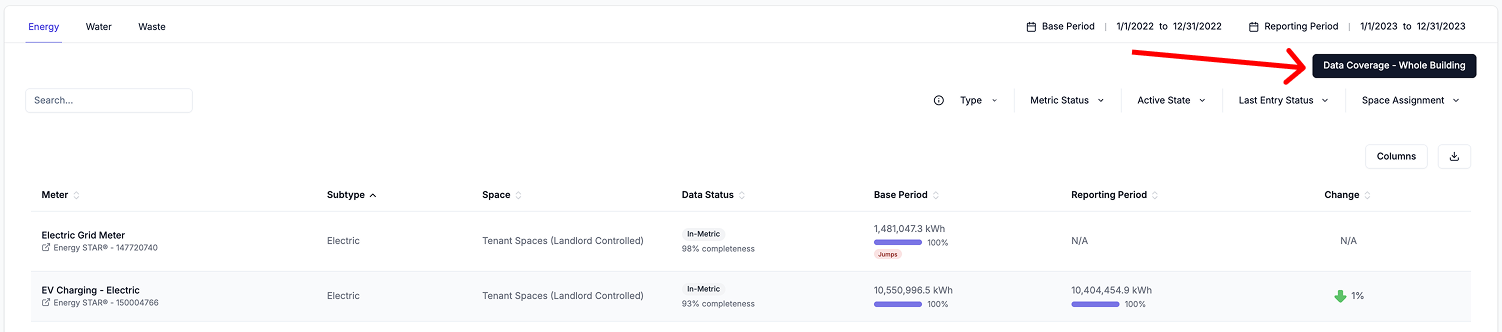
**Navigate to Property → Meters**
* Click on the **Data Coverage - Whole Building** button at the top-right
* The sidebar will open to the data coverage values associated with most recent date *prior to the end* of the selected reporting period
* [Click here](/data-coverage/manage-data-coverage) to learn how to enter data coverage values.
 ### **Portfolio Level**
**Navigate to Portfolio → Property Trends**
* Click on the **Data Coverage** toggle in the top-right plot to view the distribution of data coverages for all properties for the selected reporting period.
* Click on the pink **Data Coverage** progress bar of any property to open a sidebar to view the property's **whole building data coverage** for the selected reporting period
* [Click here](/data-coverage/manage-data-coverage) to learn how to enter data coverage values.
### **Portfolio Level**
**Navigate to Portfolio → Property Trends**
* Click on the **Data Coverage** toggle in the top-right plot to view the distribution of data coverages for all properties for the selected reporting period.
* Click on the pink **Data Coverage** progress bar of any property to open a sidebar to view the property's **whole building data coverage** for the selected reporting period
* [Click here](/data-coverage/manage-data-coverage) to learn how to enter data coverage values.
.png?fit=max&auto=format&n=W9COhIzjFYd7p3yh&q=85&s=6496545e3a6be27e1f74c685ecc9aee6) ### Space-based Data Coverages
* [Click here](/spaces/data-coverage) to learn more about tracking data coverages for landlord and tenant spaces.
***
### Space-based Data Coverages
* [Click here](/spaces/data-coverage) to learn more about tracking data coverages for landlord and tenant spaces.
***